Amendment to the Stalker Regulation Act
On November 11, 2025, an amendment to the Stalker Regulation Act was approved by the Cabinet. This amendment includes acts such as ‘acquiring location information of a lost prevention tag’ and ‘attaching a lost prevention tag’ without consent as actions equivalent to unauthorized acquisition of location information. All Elecom Group products are equipped with anti-misuse features to prevent such malicious use, ensuring safe usage. This functionality will also be included in all future smart tag releases.
What to Do if You Find an Unfamiliar Smart Tag
Should you discover an unfamiliar Elecom Group smart tag, please refer to the ‘How to Power Off Smart Tags’ section below to disable its power, then consult your nearest police station. Powering off the tag will stop all its functions, eliminating any concerns about being tracked.
How to Power Off Elecom Group Smart Tags
Here are the instructions for powering off various Elecom Group smart tag models:
| Product Name | How to Power Off |
|---|---|
| LGT-WCSTC01BK, LGT-LWCSTCW01DB (Logitec Direct exclusive) | Press and hold the power button for approximately 10 to 20 seconds. Release the power button when you hear a ‘PIRORORORO…’ sound. |
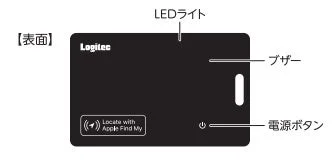
| Product Name | How to Power Off |
|---|---|
| LGT-NNCD1BKA | Press and hold the power button. Release the power button when you hear ‘PIP-PIP PEE.’ |
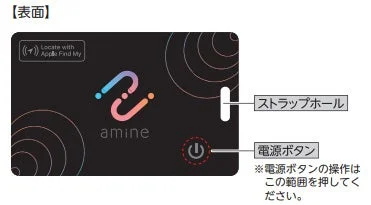
| Product Name | How to Power Off |
|---|---|
| LGT-BETG1BKA | Press the power button twice briefly, then press and hold it. Release the power button when you hear ‘PIP-PIP.’ |
| Product Name | How to Power Off |
|---|---|
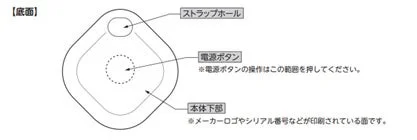
| LGT-NNTG1BKA | Press and hold the power button. Release the power button when you hear ‘PIP-PIP.’ Immediately after, a ‘PEE’ sound will play. |
| Product Name | How to Power Off |
|---|---|
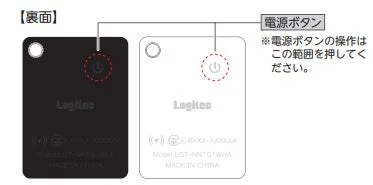
| LGT-UCTG1BKA | Press and hold the power button. |
| Product Name | How to Power Off |
|---|---|
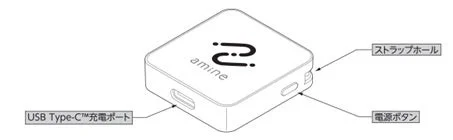
| LGT-BETG1BKG, LGT-BETG1WHG, LGT-BETG1BKG4, LGT-ELBETG1BKG, LGT-ELBETG1BKG4, LGT-LWBETG1BKG (Logitec Direct exclusive), LGT-LWBETG1BKG4 (Logitec Direct exclusive) | Press the power button twice briefly, then press and hold it. Release the power button when you hear ‘PIP-PIP.’ |
| Product Name | How to Power Off |
|---|---|
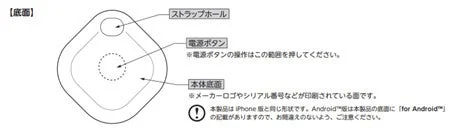
| LGT-WCCD1BKG, LGT-LWWCCD1BKG (Logitec Direct exclusive) | Press and hold the power button for approximately 10 to 20 seconds. Release the power button when you hear a ‘PIRORORORO…’ sound. |
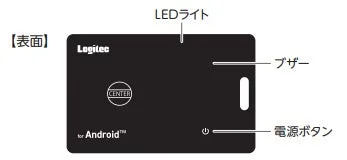
| Product Name | How to Power Off |
|---|---|
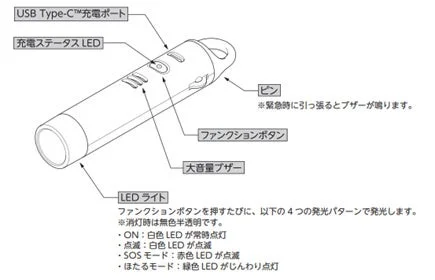
| LGT-LWUCSS1WHM, LGT-ELBETG2BKA | Press the function button twice briefly, then immediately press and hold for approximately 8 seconds or longer until an alarm sound ‘PIP-PIP’ plays, indicating the power is OFF. |
Features of Elecom Group Smart Tags
Elecom Group smart tags are developed and tested based on strict quality standards, cultivated as a Japanese manufacturer, to ensure safety and security. They feature notification and alert functions designed to prevent stalking. Furthermore, all products have obtained official certifications from Apple or Google, as well as various domestic Japanese certifications, including the Giteki mark.
Reference
For more details, please visit the Elecom official website:
Elecom News Release