
Aiarty Image Enhancer V3.8: Introducing the “AI Eraser” for Seamless Object Removal
Aiarty Image Enhancer, previously recognized for its high-quality resolution upscaling and noise reduction capabilities, now expands into the realm of photo retouching with the addition of the highly anticipated “AI Eraser” feature. This new function allows users to remove unwanted objects from images with a single click. Utilizing advanced AI algorithms, the software naturally reconstructs and complements the background based on surrounding pixel information.
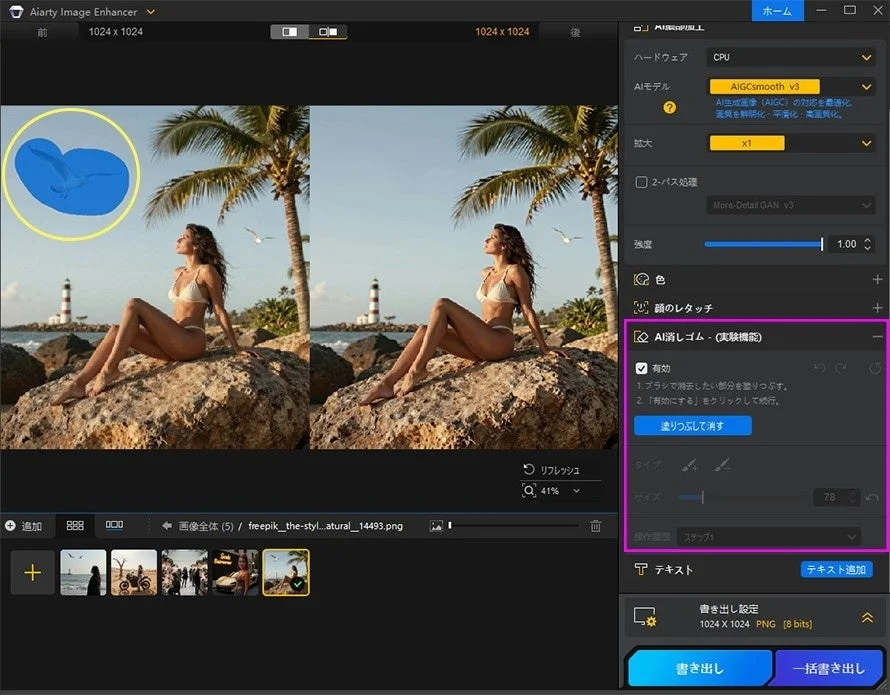
The “AI Eraser” is designed to simplify complex photo editing tasks, offering professional-level results with simple mouse operations. It addresses common editing challenges such as:
-
Removing unwanted elements: Eliminating passersby, vehicles, or power lines from scenic photos.
-
Deleting reflections and glare: Reducing light reflections or smartphone shadows in photos taken through glass.
-
Erasing text and watermarks: Cleaning images by removing unwanted text, dates, logos, or signs.
-
Refining composition: Removing distracting background elements to highlight the main subject.
This integration means that users can now achieve both image enhancement and object removal within a single software, streamlining their workflow.

For more details and to download Aiarty Image Enhancer, visit the official website:
https://jp.aiarty.com/aiarty-image-enhancer/
Aiarty Video Enhancer V3.4: Enhanced Flexibility and Stability for All PCs
Aiarty Video Enhancer, a tool for restoring old videos and upscaling low-resolution content to 4K, has been updated with a focus on operational flexibility and reduced hardware load.
Key improvements include:
-
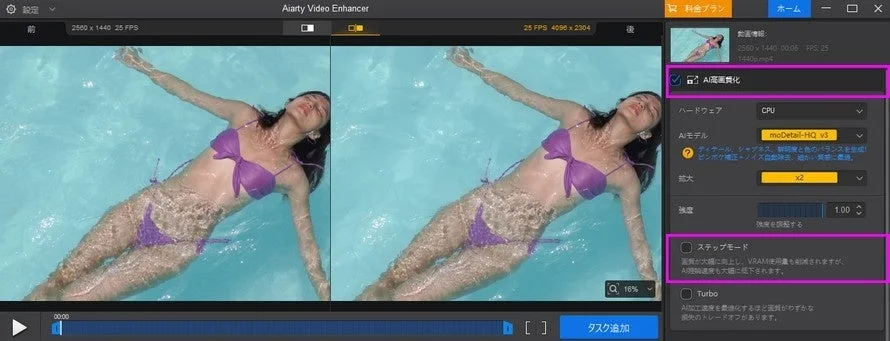
Toggle for “Super Resolution” processing: The previously mandatory “Super Resolution” (upscaling) process can now be optionally disabled via a checkbox. This allows users to apply only stabilization, color correction, or frame interpolation, significantly reducing processing time when resolution upscaling is not required.
-
Memory optimization for PCs with less than 6GB VRAM: The software now automatically detects PC environments with less than 6GB of VRAM and applies a “Step Mode.” This feature helps prevent “memory shortage errors” and “forced shutdowns” that can occur during high-load AI processing, ensuring stable video export even on entry-level PCs.
For more details and to download Aiarty Video Enhancer, visit the official website:
https://jp.aiarty.com/aiarty-video-enhancer/
Stay Updated with Aiarty
For the latest information on Aiarty products, please visit their official channels:
-
Aiarty Official Website: https://jp.aiarty.com/
-
Aiarty Official X (formerly Twitter): https://twitter.com/aiartyjp
-
Aiarty Official YouTube Channel: https://www.youtube.com/@AiartyJP-Official