The Challenge: Fragmented AI Workflows
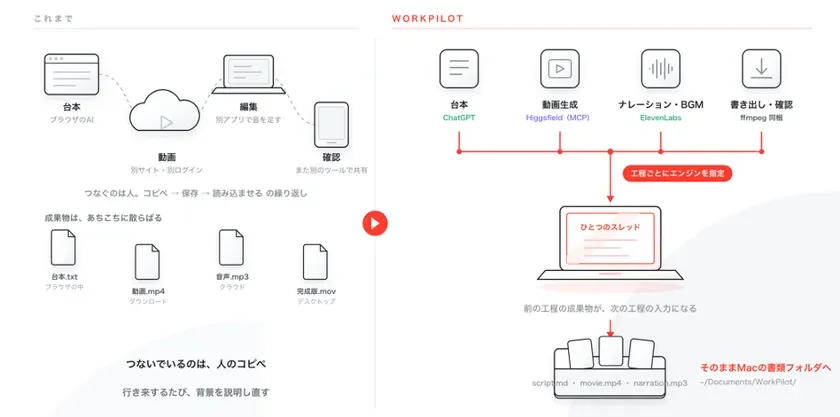
As the number of available AI tools grows, users often find themselves constantly switching between different platforms. For example, research might be done with one AI, implementation with another, and video creation with yet another service. This process often involves manually copying outputs from one AI and re-explaining the context to the next. WorkPilot was developed to bridge these gaps, creating a unified environment where various AIs can interact seamlessly.
Key Features of WorkPilot
1. Cross-Model Pipeline Automation
WorkPilot allows users to select specific AI engines and models for each step within a thread, maintaining context even when switching. A single instruction can be broken down into multiple steps, which are then automatically executed in order by the designated engines. This system leverages users’ existing subscriptions, eliminating token-based charges.
2. End-to-End Workflow Integration
WorkPilot offers six modes: consultation, image, video, article, audio, and code, enabling users to complete entire projects within a single interface. For instance, video production can be streamlined by connecting Higgsfield for video, ElevenLabs for audio, and bundling ffmpeg for export. This integration removes the need to switch between multiple applications for tasks like scriptwriting with ChatGPT, video generation, and editing.
3. Customizable and Shareable Agents
WorkPilot includes preset roles such as planner, researcher, reviewer, and legal expert, which can be freely added, deleted, or renamed. Each agent’s