Samsung Galaxy Watch Series Enhances Suica Services with Commuter Pass and Discount Ticket Support
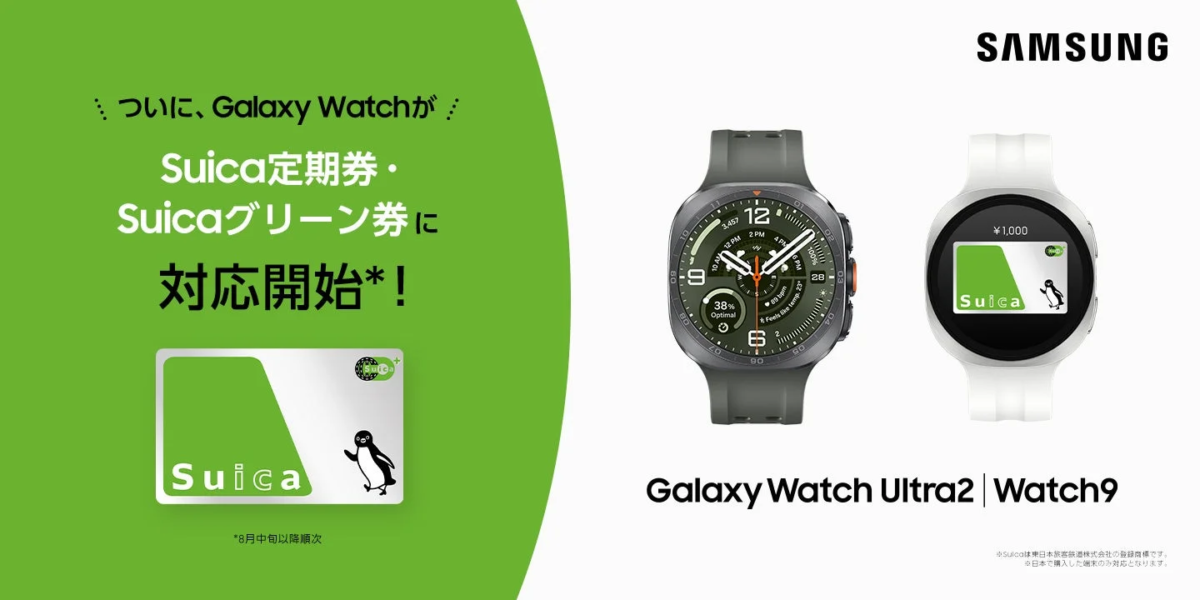
Samsung Electronics Japan has announced a significant update to its Samsung Galaxy Watch series, expanding the compatibility with East Japan Railway Company’s “Suica” transportation IC card. This enhancement allows users of select Samsung Galaxy Watch models to manage and utilize Suica services, including the purchase of commuter passes, Suica Green Car tickets, and special discount tickets, directly from the Mobile Suica app on their Android™ devices.
Previously, Suica functionality on the smartwatch was limited to charging. With this update, users gain comprehensive control over their Suica, enabling more convenient daily commutes and travel experiences. To utilize these new features, it is necessary to update the Watch software, Galaxy Wearable app, Google Wallet™️, Mobile Suica app, and other related system applications to their latest versions.

Compatible Samsung Galaxy Watch Series
The expanded Suica services are compatible with the following Samsung Galaxy Watch series models:
-
Samsung Galaxy Watch Ultra|Watch Ultra2
-
Samsung Galaxy Watch9
-
Samsung Galaxy Watch8|Watch8 Classic
-
Samsung Galaxy Watch7
-
Samsung Galaxy Watch6|Watch6 Classic
It should be noted that only devices sold in Japan are supported, and the list of eligible models is expected to expand in the future. A separate Android device paired with the smartwatch is required for management.
Service Overview
Users can now confirm and operate the Suica on their smartwatch via the Mobile Suica app on their Android device. A watch icon displayed on the top left of the Suica card in the Mobile Suica app indicates its pairing status with the smartwatch.
With this update, the following services become available for Suica on the smartwatch:
-
Charging from a credit card registered in the Mobile Suica app.
-
Purchase of commuter passes.
-
Purchase of Suica Green Car tickets.
-
Purchase of special discount tickets.
To access these services, downloading and logging into the Mobile Suica app are necessary.
Suica Setup Method
① For new Suica migration to a smartwatch
On an Android device (Mobile Suica app):
- Tap “Confirm/Switch main card” in the Osaifu-Keitai app’s My Services.
- Tap “Deposit card (model change)” to deposit the card.
On the smartwatch:
- Open the Google Wallet app on the smartwatch.
- Tap the [+] button. Follow the instructions displayed on your paired smartphone to add Suica.
- The smartwatch’s Suica will then appear in the Android device’s Mobile Suica app. The watch icon on the top left of the Suica confirms its pairing status with the smartwatch.
② If Suica is already issued on the smartwatch
The smartwatch’s Suica will automatically appear in the Android device’s Mobile Suica app. The watch icon on the top left of the Suica confirms its pairing status with the smartwatch.
Suica Issuance Steps
- In the Galaxy Wearable app, tap the three-line button, then select “Google Pay,” or select “Add card” in Google Wallet on the watch.
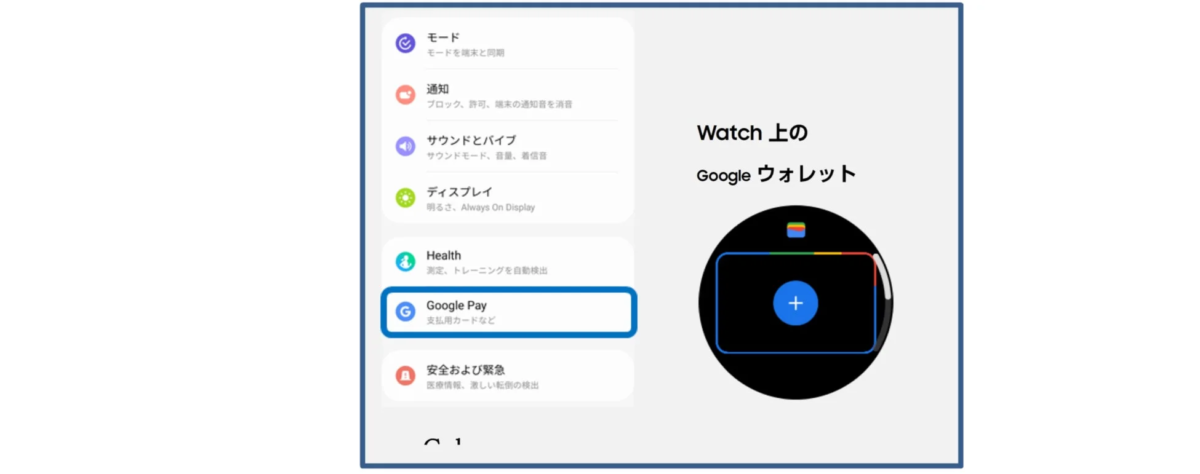
- Within Google Wallet, select “Suica.”
- Enter the necessary information.
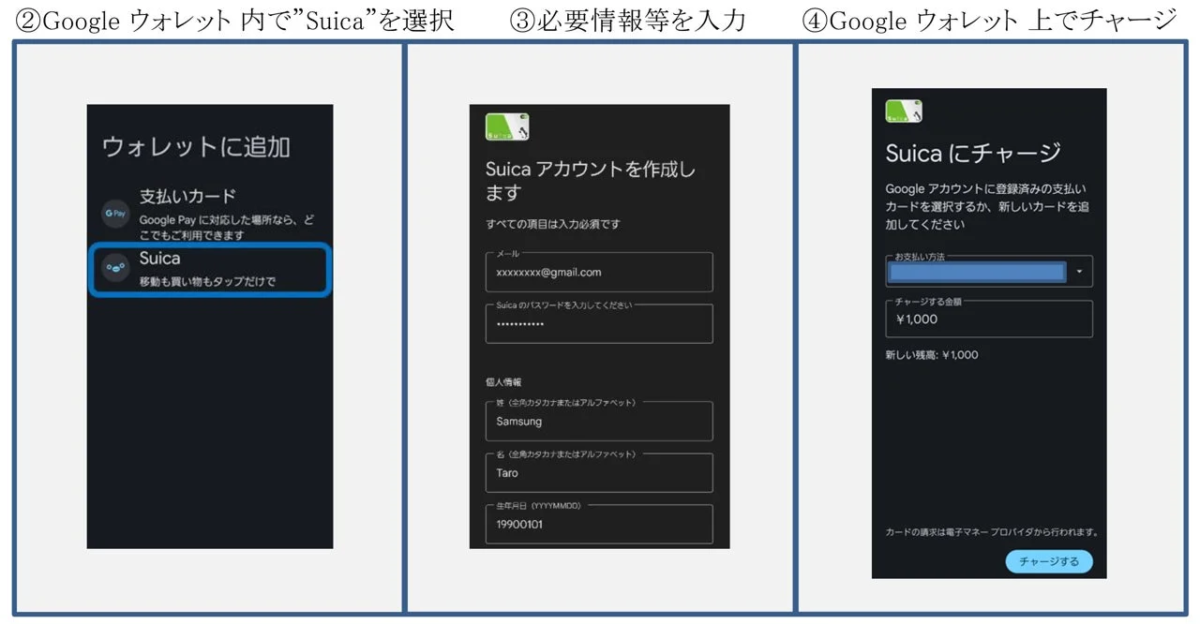
- Charge Suica via Google Wallet.
- Suica issuance and registration of commuter passes/etc. will be completed.
Product Details
For more information on the Samsung Galaxy Watch series, please visit the official Samsung website:
-
Samsung Galaxy Watch9: https://www.samsung.com/jp/watches/galaxy-watch/galaxy-watch9-40mm-cream-bluetooth-sm-l340nzejxjp/
-
Samsung Galaxy Watch Ultra2: https://www.samsung.com/jp/watches/galaxy-watch/galaxy-watch-ultra2-titanium-silver-lte-sm-l715fzsjsjp/
-
Samsung Galaxy Watch Series: https://www.samsung.com/jp/watches/all-watches/
Trademarks
-
“Samsung Galaxy” is a trademark or registered trademark of Samsung Electronics Co., Ltd.
-
“Suica” and “Mobile Suica” are registered trademarks of East Japan Railway Company.
-
Android, Google Play, Wear OS by Google, and Google Wallet™️ are trademarks of Google LLC.
-
Other company names, product names, and service names mentioned are trademarks or registered trademarks of their respective owners.