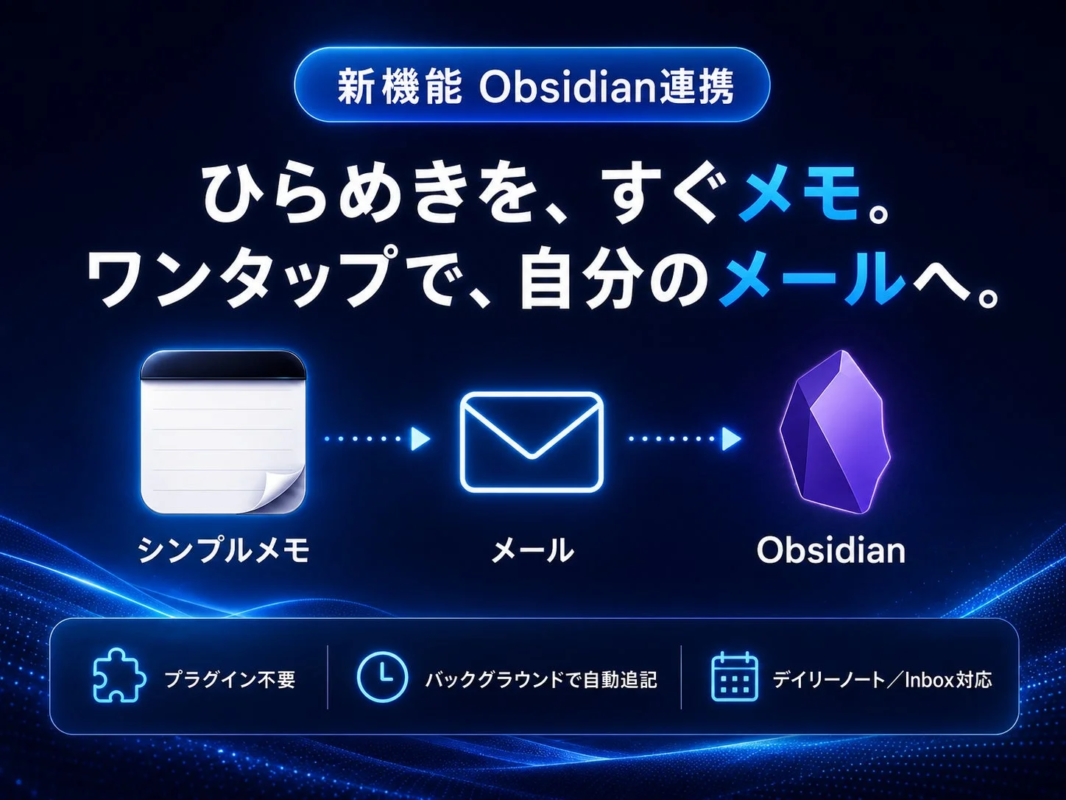
Obsidian Integration: Bridging Quick Capture and Knowledge Management
The new Obsidian Integration feature extends the app’s core functionality, connecting the initial thought capture directly to Obsidian, a popular tool for knowledge management. Memos sent through “Simple Memo” are automatically appended to an Obsidian vault, in addition to being sent to the user’s email address. This allows users to quickly jot down ideas on their iPhone and then organize them systematically in Obsidian later, effectively dividing the tasks of capture and organization with a setup process that takes approximately one minute.
This integration addresses a common challenge for Obsidian users: quickly capturing initial thoughts when away from their main workspace. “Captio-style Simple Memo” excels at capturing these “first words” with minimal taps, while Obsidian is superior for accumulating, linking, and developing these notes. The integration acts as a seamless bridge, ensuring that ideas flow from quick capture to a structured knowledge base without manual copy-pasting or sharing.
Key Features of Obsidian Integration:
-
No Community Plugins Required: The feature operates using standard Obsidian functionalities, directly writing notes to the vault folder on iCloud Drive. No additional Obsidian settings or plugins are needed.
-
Automatic Background Appending: Once enabled and the vault folder is selected, sent memos are automatically appended to notes in the background, without launching Obsidian.
-
Choice of Destination: Users can choose to send memos to their “Daily Note” (appended to
yyyy-MM-dd.mdfor a chronological log) or an “Inbox Note” (appended to a single, fixed file for later sorting). -
Timestamped Appending: Memos are added as new lines in the format “- HH:mm Memo content,” preserving existing content and maintaining a chronological record.
-
Dual Record: Memos are still sent to email, providing a backup and ensuring access even when Obsidian is not in use.
-
Privacy-Conscious Local Processing: All Obsidian appending occurs locally on the device, with no changes to the existing secure transmission and encryption pathways. Memo content is never permanently stored on YURIKA Inc.’s servers.
-
Quick Setup: Configuration takes about one minute, involving only the selection of the vault folder and destination.
Voice Input: Speak Your Thoughts into Notes
Alongside Obsidian Integration, the update also introduces “Voice Input.” Tapping the microphone icon on the memo screen allows users to speak their thoughts, which are then converted to text and entered into the memo field. This feature facilitates note-taking in situations where typing is inconvenient, such as while walking or driving.
Voice Input Highlights:
-
On-Device Processing: Speech-to-text conversion is completed entirely on the device, ensuring no audio data is sent to external clouds or servers. It also functions offline.
-
No Additional Cost: This feature is available within the free plan.
-
Seamless Integration: Voice input complements keyboard input, offering an alternative method without disrupting the established “write and send” workflow.
Anticipated Use Cases:
-
Capture First, Organize Later: Quickly capture all thoughts into an Inbox Note, then sort them at a later time, such as on weekends.
-
Daily Logging/Journaling: Utilize Daily Notes for a timestamped log of daily thoughts and activities.
-
Meeting Notes: Capture key points during meetings with a single tap, creating a chronological draft for meeting minutes in Obsidian.
-
Reading/Citation Notes: Send interesting passages directly to Obsidian while reading, consolidating reading notes.
-
Zettelkasten/Second Brain: Capture idea seeds on the go, then link and develop them within Obsidian.
Operating Conditions and Important Notes:
“Captio-style Simple Memo” is an iPhone app (iOS 16.0 or later). The Obsidian vault must be located on iCloud Drive or “On My iPhone” and accessible via the Files app. Daily Notes assume the yyyy-MM-dd.md format. For custom vault naming or locations, the Inbox Note option is recommended. Obsidian Sync-exclusive vaults may not appear in the folder selection, potentially falling back to a URL scheme method (where Obsidian briefly opens during appending). Due to iCloud synchronization, it may take a few seconds for changes to reflect in Obsidian. Voice input requires a recent iOS environment that supports on-device speech recognition; if unsupported, the microphone icon will not appear, and only keyboard input will be available.
Pricing and Availability:
“Obsidian Integration” and “Voice Input” were released as part of the version 3.0 update on May 30, 2026. Both features are available in the free plan. “Captio-style Simple Memo” is free to download and use, with in-app purchases available. The Obsidian integration feature can be accessed by enabling “Advanced Mode” in the app’s settings.
Product Overview
-
Product Name: Captio-style Simple Memo
-
Current Update: Version 3.0 (“Obsidian Integration,” “Voice Input”)
-
Release Date: May 30, 2026
-
Price: Free, with in-app purchases
-
Supported OS: iOS 16.0 or later
-
Distribution: App Store
-
Official Website: https://simplememofast.com
-
Feature Page: https://simplememofast.com/obsidian/
-
App Store: https://apps.apple.com/jp/app/id6758438948
About YURIKA Inc.
YURIKA Inc., based in Shibuya, Tokyo, and led by AI ATAKA, aims to solve minor inconveniences in daily work and life through simple digital products. “Simple Memo” was developed to facilitate quick information capture and reliable retrieval. In an era of increasingly complex digital tools, the app deliberately focuses on the minimalist experience of “write and send” to support the speed of thought and action for business professionals.
Company Information
-
Company Name: YURIKA Inc.
-
Location: Shibuya Dogenzaka Tokyu Building 2F-C, 1-10-8 Dogenzaka, Shibuya-ku, Tokyo
-
Operating Officer: AI ATAKA
-
Official Website: https://simplememofast.com
Contact for Inquiries
-
YURIKA Inc. Simple Memo Public Relations
-
E-mail: support@simplememofast.com
-
Inquiry Method: Primarily via email
“Obsidian” is a trademark of Dynalist Inc. (Obsidian.md). This service is not an official or affiliated service of Obsidian.
“Captio” is a trademark or registered trademark of its respective rights holders. “Simple Memo” is not an official successor app or affiliated service of Captio. The term “Captio-style” in this release is used to describe the memo workflow of sending emails to oneself.
Specifications and compatibility are as of the release date.